kveik
local-first Mac tools for freelance client work
møtfoloDøgntjent.
08:00AM

A working day.
You start work.
Your tools start remembering.

Below is one day, the way kveik's tools would record it for you — quietly, locally, with nothing typed twice. Scroll forward through it.
the day runs downward · the line fills as time passes
09:14
møt · the call
Kickoff with a new client.
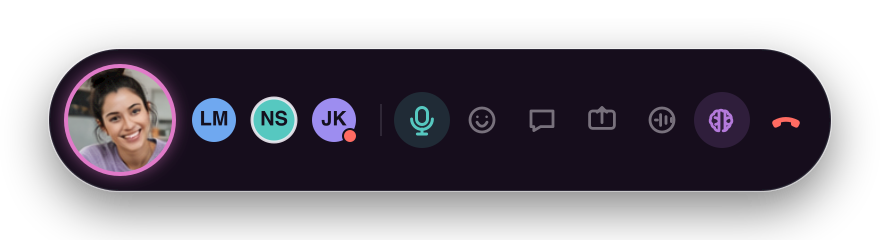
A call opens for up to 5 people, with screen-share and annotations directly on the work. Media is peer-to-peer by default; an encrypted TURN relay carries it only when a direct connection fails. The call lives in a compact presence bubble above whatever you are doing; with everyone’s consent, on-device transcription is optional.
usemot.app ↗ · free
Møt presence bubble with an active speaker and compact meeting controls
09:14 · møt Active speaker → presence dots → controls
09:14
folo · the recorder · meanwhile
It records itself.
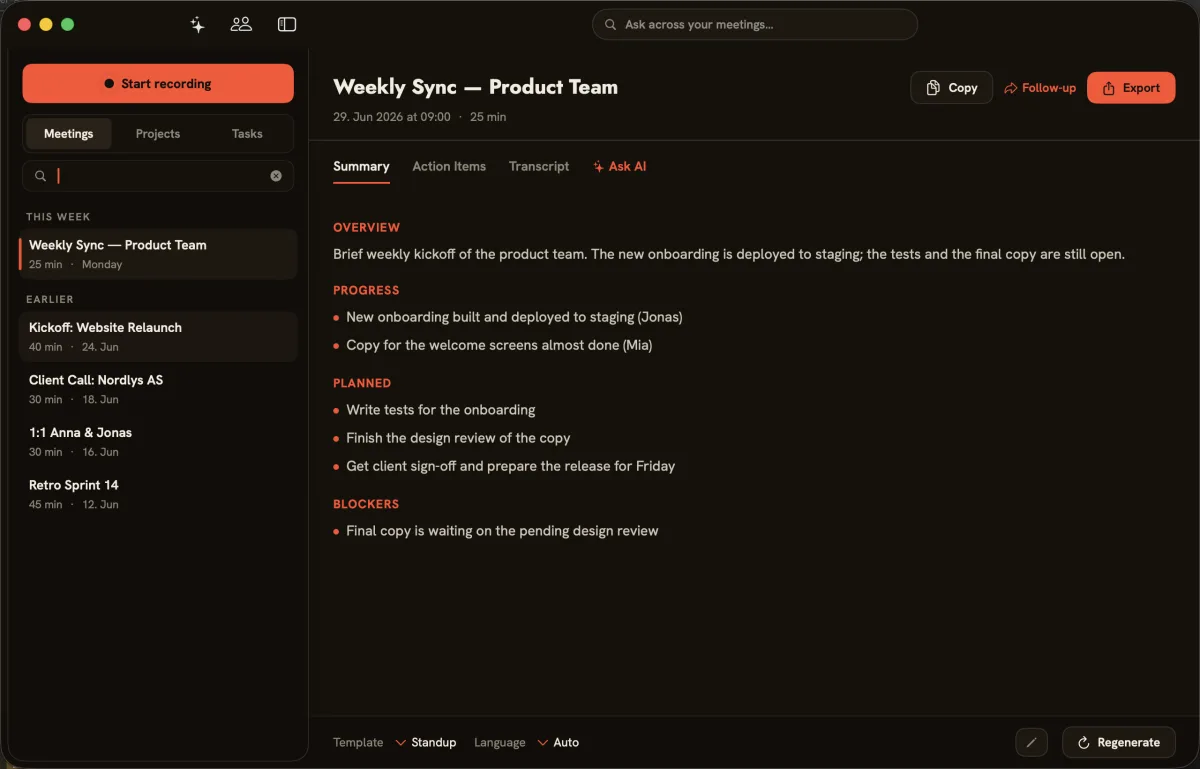
You don’t press anything. folo is already capturing the call → afterwards it hands back a transcript, a summary, and the action items. One of them: “send invoice Friday.” That gets remembered too. On-device by default — your audio stays on your Mac.
getfolo.app ↗ · €119 once
folo meeting summary with decisions and action items
09:14 · folo Call → summary → action items
10:40
Døgn · the tracker
You get to work. The clock runs on its own.
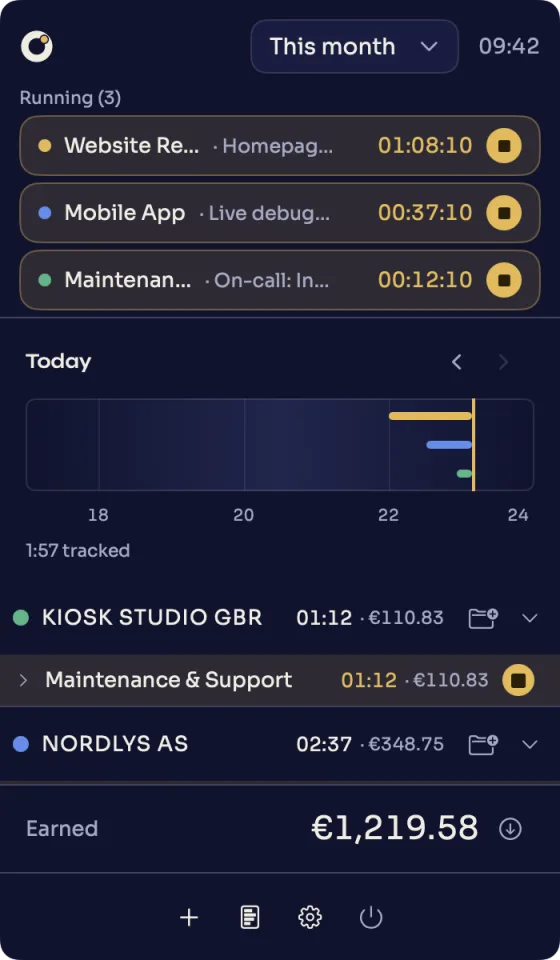
No timer to start. Døgn draws the morning onto a 24-hour line and files it under the right client — 3.2 hours of build, caught without a single “did I track that?” It also picks up your AI coding sessions (Claude Code, Codex) automatically, with on-device summaries.
dogn.app ↗ · €49 once
Døgn popover with parallel timers, a daily timeline and earnings
10:40 · Døgn Timeline → projects → earnings
13:30
folo · the recorder
A short review call.
Half an hour, recorded and summarised before you’ve closed the window. The decision you made is searchable across every call you’ve ever had — not lost in a notebook.
15:50
Døgn · the tracker
Afternoon block. Same client, second project.
Another 1.5 hours, on the line, in the right place. By 18:00 the day is just… recorded. You didn’t keep the books — the tools did.
— three more days, same quiet recording → Friday —
// Friday · 16:40

tjent. turns the week into a compliant invoice. In seconds.

Nothing copied by hand. The hours Døgn caught arrive as draft line items, the calls folo recorded supply the context — you check it and send. tjent outputs ZUGFeRD & XRechnung, covers EÜR and UStVA, and exports to DATEV. Every line still knows exactly where it came from — pull the thread.
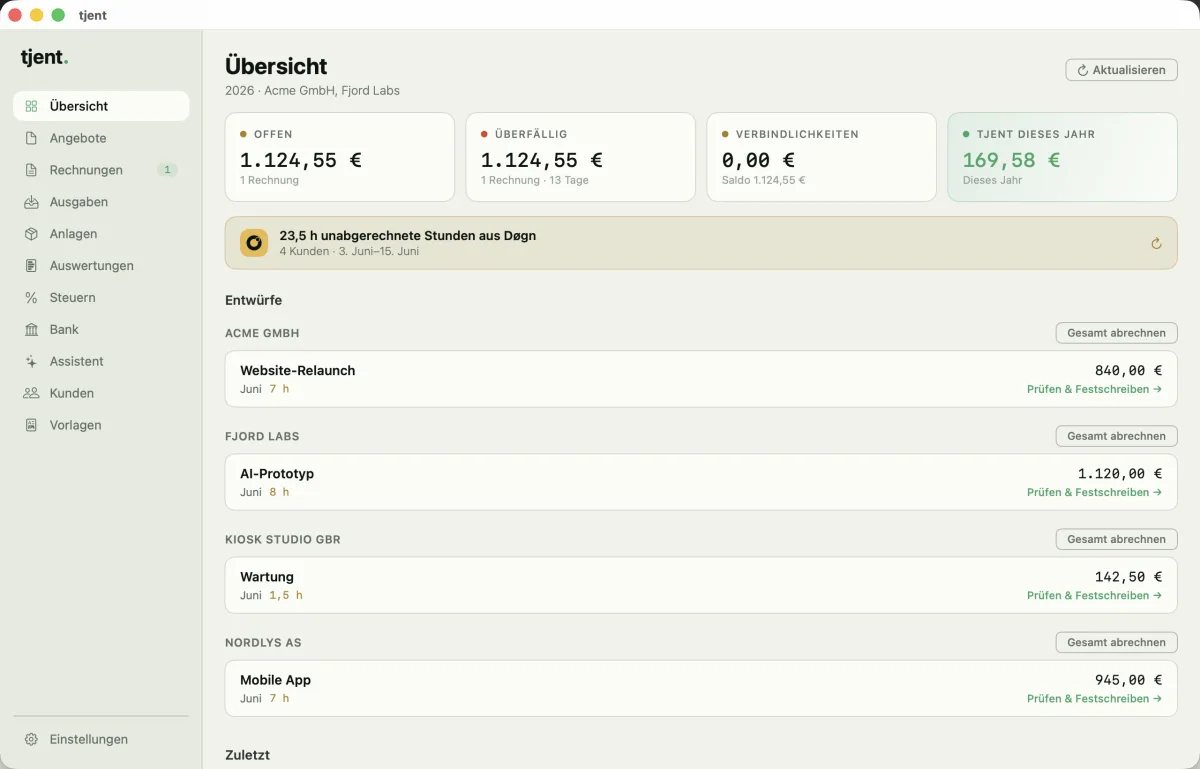
tjent overview with Døgn hours and draft invoices
Friday · tjent Døgn hours → draft invoices → send
Tue 09:14 · møt + folo
Kickoff call · recorded, 31 min
Tue 10:40 · Døgn
Build · morning block, 3.2 h
Tue 13:30 · folo
Review call · recorded, 0.5 h
Tue 15:50 · Døgn
Second project · afternoon, 1.5 h
Invoice · #0042via tjent
tjent.
Fri, this week
Kickoff & scoping call 0.5 h € 60 from Tue 09:14 · møt + folo
Build — week 1 3.2 h € 384 from Tue 10:40 · Døgn
Review & revisions 0.5 h € 60 from Tue 13:30 · folo
Second project — setup 1.5 h € 180 from Tue 15:50 · Døgn
Total · 5.7 h € 684
XRechnung & ZUGFeRD ready · sent in one click
Your work remembers itself.
That trace — from an invoice line back to the moment that earned it — is the core of everything we build.
All kveik software is in beta until 1 August 2026.
// the studio behind it

Two of us, in Germany, building tools you own — not rent.

Every app for the boring half of freelancing wanted a monthly fee, an account, and our data on someone’s server. So we build the opposite: small, single-purpose, local-first Mac tools, bought once, that quietly hand off to each other. A house of related tools from one foundation — which is roughly what kveik means: a Norwegian brewing yeast passed between farms, kept alive across generations.

buy oncelocal by defaultone tool per jobnothing typed twice
N
Nico
building kveik
S
Stephan
building kveik
kveik · say it “kvike” · all kveik software stays in beta until 1 August 2026
// questions

Questions, answered

What is kveik?
kveik is a house of small, local-first Mac tools for freelance client work — folo, Døgn, tjent and møt. Each one does a single job and quietly hands off to the next. The name comes from a Norwegian brewing yeast passed between farms across generations.
Which tools are in the kveik suite?
folo records and transcribes your calls on-device (€119 once). Døgn tracks your working hours automatically — including AI coding sessions — on a 24-hour timeline (€49 once). tjent turns those hours into compliant German invoices with ZUGFeRD/XRechnung, EÜR, UStVA and DATEV export (€149 once, with 24 months of updates included; after that, legal updates are €49/year). møt is a peer-to-peer video tool for up to 5 people with a compact floating presence bubble, screen sharing and optional local transcription (free).
Are the tools local-first and private?
Yes — storage and processing are local by default. Update and license checks and møt signaling exchange operational metadata; møt media is peer-to-peer by default with encrypted TURN relay fallback. Optional ElevenLabs transcription uploads audio, while cloud AI and Claude Code send selected context to their providers; Claude Code reaches Anthropic through the local CLI. Configured webhooks send selected payloads, and connected local MCP clients can access suite data; the client’s own network and privacy behavior is outside the apps.
Who is kveik for?
Freelancers, independent contractors and small studios who bill by the hour and want their tools to be owned, not rented. Particularly useful if you work on a Mac, do client calls, and need compliant German invoicing.
What does it cost? Is anything free?
møt is free. folo is €119 once, Døgn is €49 once, tjent is €149 once with 24 months of updates included, then €49/year for legal updates. All are buy-once — no subscriptions.